What Is AI Ticketing System?
An AI ticketing system is a smart management solution that automates traditional IT support processes using artificial intelligence and machine learning.
By leveraging Generative AI and Natural Language Processing (NLP), these systems instantly analyze and categorize requests, route them to the correct teams, and even resolve simple issues without human intervention.
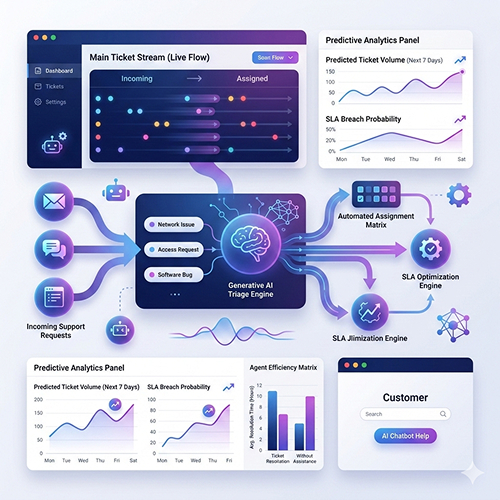
5 Critical Issues in ITSM Ticket Management
1. Manual Ticket Categorization
IT teams are forced to manually review every incoming ticket and assign it to the correct category. This process leads to both a loss of time and inaccurate classifications.
2. Slow Prioritization
Identifying critical tickets, manually tracking SLA processes, and prioritizing tasks consumes valuable time.
3. Repetitive Questions
Routine requests such as “I forgot my password,” “I can’t connect to the VPN,” or “The printer isn’t working” occupy 40–50% of the IT team’s time.
4. Long Resolution Times
Due to manual processes, tickets remain pending for long periods, leading to decreased user satisfaction and increased SLA breaches.
5. Inadequate Reporting and Analysis
Extracting meaningful insights from ticket data, performing trend analysis, and optimizing processes are nearly impossible using manual methods.
What Is the Real Cost of Your ITSM Investment?
Fill it in within 2 minutes — discover how much you could save annually with SPIDYA.
This calculation is based on estimated values. Actual savings may vary depending on company size and usage scenarios.
🎉 Calculation Completed
Estimated Annual Savings: TL
Estimated Monthly Savings: TL
Let’s turn this saving into reality
SPIDYA experts can prepare a custom cost analysis for your company. Free and commitment-free.
📩 Request Free Analysis* Calculation is an estimate based on SPIDYA customer data and industry averages. Actual results may vary.
How AI Ticketing System Working?
AI ticketing system is a next-generation solution that automates ticket management within ITSM processes by leveraging artificial intelligence and machine learning technologies.
🔵 Core Operating Principles of AI Ticketing
1. Automated Intake and Categorization
Every incoming request (email, portal, chat) is automatically converted into a ticket and assigned to the correct category by AI.
2. Smart Prioritization
AI performs automatic priority assignment by analyzing ticket content, SLA (service level agreement) rules, and historical data.
3. Automated Routing
Tickets are automatically directed to the correct technician based on content analysis and team expertise.
4. L0 Solution Recommendations
For simple and repetitive requests, AI provides instant self-service solutions to the user.
5. SLA Monitoring and Alerts
AI detects SLA (Service Level Agreement) risks in advance and sends proactive warnings.
Technical Infrastructure
Natural Language Processing (NLP): Understanding and categorizing ticket content.
Machine Learning: Learning from historical data and making predictions.
Generative AI: Creating automated responses and suggesting solutions.
API Integration: Seamless integration with existing ITSM tools.
AI Ticketing System Implementation Steps
✓ Situational Analysis and Platform Selection
The first step for a successful AI ticketing system implementation is to clearly understand your current situation.
✓ Determine Your Current Ticket Volume
What is your average monthly ticket count?
How many of these tickets fall into the L0/L1 category (simple, repetitive issues)?
What is your average ticket resolution time?
What is your SLA breach rate?
✓ Platform Selection Criteria
Local and Reliable: 100% local, KVKK-compliant solutions like SPIDYA ITSM
Generative AI Support: Modern NLP and GPT technologies
Easy Integration: RESTful API support
Low-Code Infrastructure: Opportunity for rapid customization
ITIL Compliance: Alignment with standard ITSM processes
Turkish Language Support: Optimized for the local market
SPIDYA ITSM: AI-Powered Ticket Management
SPIDYA IT Service Management is a local ITSM solution offering AI-powered ticket automation. The platform provides the following features:
Automated L0 Request Fulfillment: Routine tasks such as password resets and access requests are resolved automatically by artificial intelligence.
Smart Ticket Assignment: It analyzes every request and routes it to the correct team.
SLA Analysis and Insights: It pre-identifies SLA risks by analyzing historical data.
ITIL-Compliant Processes: Incident, Problem, and Change Management modules.
Low-Code Infrastructure: Rapid customization with the Cheetah platform.
SPIDYA ITSM provides more comprehensive automation by working in integration with NOC (Network Operation Center) Monitoring systems.
✓ Data Preparation and AI Training
The success of an AI ticketing system is directly related to high-quality data.
- Prepare Historical Ticket Data
- Data Collection: Export your ticket data from the last 6–12 months.
- Data Cleaning: Correct missing, incorrect, or inconsistent records.
- Categorization: Standardize your existing ticket categories.
- Train the AI Model
Provide at least 50–100 sample tickets for each category. Train the model using ticket titles and descriptions. Test the accuracy rate (aim for 85%+).
- Prioritization Rules
Define your SLA rules. Determine criticality levels. Create a prioritization model based on historical data.
- Automated Routing Logic
Define the areas of expertise for team members. Optimize workload distribution. Choose between round-robin or skill-based assignment.
✓ Pilot Implementation and Testing
A controlled pilot process is crucial before going live.
Define the Pilot Scope Single Department Approach:
Select a single department for the initial phase (e.g., HR or Finance).
A unit receiving a moderate volume of tickets is ideal.
Plan for a 2–4 week pilot duration.
Metrics to Track During the Pilot Process
Automated categorization accuracy
Assignment precision
Mean Time to Repair (MTTR)
SLA compliance rate
User satisfaction
✓ Go-Live
Once the pilot is successful, it is time to roll out to the entire organization.
Pre-Go-Live Preparation
Training: New process training for the IT team, self-service portal introduction for end-users, and dashboard and reporting training for managers.
Phased Rollout: Week 1: Pilot departments; Week 2: Other non-critical departments; Week 3: Entire organization.
Support Readiness: Ensure the technical support team is ready during go-live, prepare FAQ documents, and define emergency procedures.
Tangible Benefits Achieved with AI Ticketing System
- Operational Efficiency
Manual Categorization: 90% reduction
Ticket Assignment Time: 85% reduction
L0 Ticket Resolution: 100% automation
Mean Time to Resolution (MTTR): 40–60% decrease
2. Cost Savings
IT Team Productivity: 30–50% increase
FTE Savings on Repetitive Tasks: 2–3 people
Overtime Costs: 40% reduction
3. Service Quality
SLA Compliance Rate: Increase from 65% to 95%
First Response Time (FRT): 50% reduction
Ticket Reopen Rate: 30% decrease
CSAT Score: 25–30% increase
FAQ
Can it Integrate with My Existing ITSM Tool?
Yes, modern AI ticketing system solutions offer RESTful APIs. SPIDYA ITSM is powered by the Cheetah Low-Code Platform, allowing it to seamlessly shake hands with the tools you already use and trust—ITSM systems, monitoring solutions, and databases.
How Long Does Implementation Take?
Pilot Implementation: 2–3 weeks
Go-Live: 1–2 weeks
Total: 4–6 weeks (depending on organizational complexity)
How is Security Ensured?
Data Encryption: All data is stored with encryption.
Compliance: KVKK and ISO 27001 compliant.
Access Control: Role-Based Access Control (RBAC).
Monitoring: Audit trail and log tracking.
Data Residency: Local server options available.
Your Next Step: Take Action Now!
AI ticketing is no longer optional; it is a necessity to stay competitive. Organizations relying on manual ticket management face the following compared to competitors using automation:
50–70% slower resolution times
30–40% lower user satisfaction
2–3 times higher operational costs