What Is AI-Powered Mail-to-Ticket?
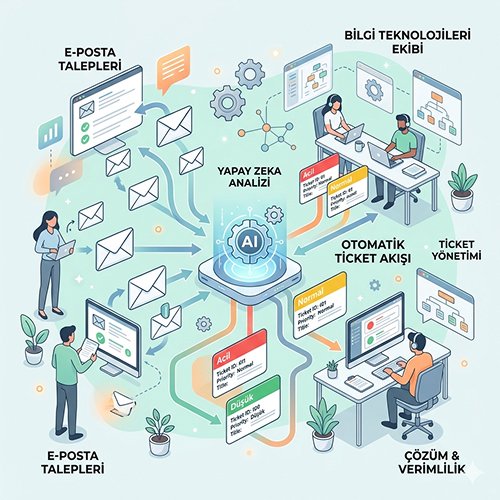
AI-powered Mail-to-Ticket is an intelligent system that analyzes incoming emails and automatically converts them into digital requests. As a core component of a modern IT support management strategy, this technology eliminates manual data entry, categorizes tickets by urgency, and instantly assigns them to the correct expert team.
For example: A user sends an IT support management request via email. Within minutes, three different team members reply separately. Who will solve it, who will step back? It’s unclear. The resolution is delayed, the user receives three conflicting pieces of information, and the workflow grinds to a halt.
This time, it was noticed by chance. But what about the ones that go unnoticed?
The vast majority of enterprises still manage their IT support processes through email. How many IT requests did you lose this week? If you don’t know the answer, this article is for you.
Before making a decision, ask yourself one question
If email is still at the center of your IT support management process, how many of the six hidden costs above sound familiar? Discover how you can transform your email workflow, structure your SLA management, and see how AI-powered ticket management can work in your own environment.
Contact UsThe 6 Hidden Costs of Email-Based IT Support Management
Managing IT support management via email may seem simple, but every open inbox is a silently growing cost item.
1. Orphaned requests and SLA violations:
Every hour that passes without a clear owner violates your service level agreement. IT support teams usually only discover this after the fact, during reporting.
2. Duplicate responses and conflicting interventions:
When multiple people respond to the same request, it confuses the user and wastes the team’s time. The cost of coordination is invisible, but it is real.
3. Lack of prioritization:
A critical failure halting the production line or a printer issue—both sit side-by-side in the inbox. In the absence of an effective IT support management process, who makes this distinction, and how?
4. Impossibility of KPIs and reporting:
How many requests were received, how many were resolved and in what timeframe, and how much work did each team member complete? IT service management metrics cannot be reliably measured in email-based systems.
5. Loss of information and context:
“I deleted that email,” “I didn’t see it,” “It went to spam.” Every lost email means a lost support request. History cannot be tracked, leaving no audit trail for compliance.
6. Scaling barriers:
As the team grows and the volume of IT support requests increases, email-based processes don’t just decline linearly—they deteriorate exponentially. Growth doesn’t bring order; it only increases the scale of the chaos.
NOC ticketing is a centralized AI system for resolving network incidents. Monitor and repair your infrastructure seamlessly with automated ticket management.
How Mail-to-Ticket Works?
Even if looks like a technical transformation, Mail-to-ticket is a IT Support Management decision.
Automated ticket creation
As soon as an email from a user hits the system, it is automatically converted into a service request record. A unique ticket number is assigned, and the sender is notified. No request is left in the uncertainty of “was it seen or not?”
AI-powered classification and prioritization
By reading the email content, artificial intelligence places the request in the correct category and determines its priority level. “Urgent,” “normal,” “low” — this decision is no longer made by a person scanning an inbox, but by the system itself.
SPIDYA AI-powered mail-to-ticket infrastructure:
Analyzes the content,
Applies the impact-urgency matrix,
Routes the request to the relevant team.
The Cheetah Low-Code Platform operating behind this workflow allows every company to shape the system according to its own process logic—from category rules to assignment criteria—without writing code. In IT support management, human intervention is shifted away from routine decisions and focused on resolving actual problems.
Assignment rules and notification workflow
Which category goes to which team, and who gets notified at which priority level—these are predefined. The system assigns based on rules, sends notifications, and triggers automatic alerts when escalation thresholds are reached. SLA tracking is carried out seamlessly by the system.
4-Step Transition Plan to Mail-to-Ticket
1. Map your current email flow
How many requests arrive at which address, who sees them, and who responds? You cannot transform your IT support management process without first creating this map.
2. Define category and priority logic
Divide your requests into 5-8 main categories. Determine response and resolution times for each category. This step also forms the foundation of your SLA (service level agreement) structure.
3. Launch a pilot in a single department
Instead of transitioning the entire company at once, start with one team or location. Scale the ticket system across the organization only after it has been validated.
4. Involve users in the process with a self-service portal
Long-term efficiency depends on users not seeing ticket creation as a burden. An intuitive self-service interface eliminates “what is the status?” inquiries to your team and makes your IT support management process sustainable from the user’s perspective as well.