What Is Field Service Management Software?
Field Service Management Software enables teams working across multiple locations to manage equipment, inventory, and processes in real time from a single platform. With mobile access, barcode systems, and instant notifications, it eliminates the loss of control caused by manual coordination.
Why Is Field Service Management Software Important?
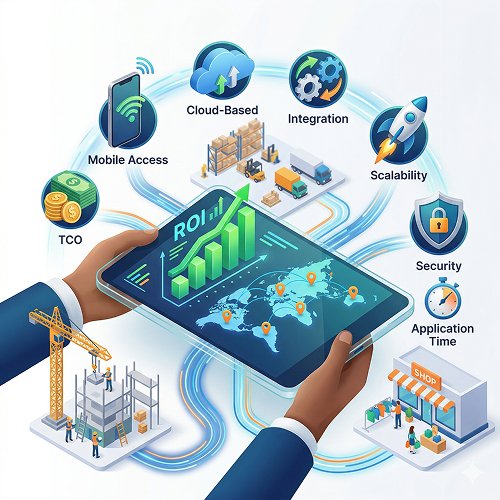
Choosing field service management software is not just about comparing feature lists — the wrong choice impacts not only your operations but directly your budget. Construction companies need accurate equipment tracking, logistics firms require full warehouse visibility, and retail chains must manage branch inventory efficiently with the right system.
Evaluate Your Operations with SPIDYA FSM!
Let’s review the 7 key criteria together and see if your field operations are ready.
Request a DemoERP or FSM? Choose the Right System First
Many companies try to extend their existing ERP system for field operations — and often end up disappointed.
The reason is simple: ERP (Enterprise Resource Planning) systems are designed for finance, production, and supply chain management — not for the needs of field operations.
Before making a decision, ask yourself this:
Is your core challenge accounting and production integration, or is it managing field teams, equipment, and inventory visibility?
| Category | ERP | FSM / Field Service Software |
|---|---|---|
| Finance & Accounting | Strong | Limited |
| Production & Supply Chain | Strong | Limited |
| Field Equipment Tracking | Weak | Strong |
| Mobile Field Access | Limited | Strong |
| Multi-Location Visibility | Moderate | Strong |
| Barcode / QR Code Management | None / Add-on Required | Strong |
| Real-Time Notifications | Limited | Strong |
| Implementation Time | 6–18 months | 2–8 weeks |
| Initial Cost | High | Low (SaaS) |
7 Criteria for Choosing Field Service Management Software
Before evaluating any vendor list, define clear expectations for your own operations across each of these seven criteria.
- For construction companies, equipment tracking and enterprise reporting come first.
- For logistics firms, multi-warehouse visibility and integration are critical.
- For retail chains, branch-level inventory control is the key factor.
The priority of these criteria varies by industry — evaluating solutions without clear expectations often leads to decisions shaped by sales presentations rather than real needs.
Criterion 1 — Mobile Access & Offline Capability
- Field teams don’t always have a reliable internet connection.
Does the system offer a native mobile app, or is it only web-based? - Can data be entered offline and automatically synchronized once a connection is available?
In practice, this is one of the most noticeable differences.
Criterion 2 — Multi-Location & Multi-Team Support
Location-based filtering, user permissions, and the ability to manage different warehouse-site combinations simultaneously are critical. If you start with 2 locations and plan to grow to 14, can the system handle that scale?
We’ve explored in detail the challenges of multi-location operations and the impact of digital visibility. Read our article: “What Is Digital Field Management?”
Criterion 3 — Integration with Existing Systems
If you are already using an ERP, accounting software, or project management tool, the FSM (field service management) must offer API integration.
For logistics companies, TMS; for construction firms, project management tools; for retailers, POS systems — regardless of industry, integration gaps can become the biggest hidden cost over time. Be sure to test this before evaluating any solution.
Criterion 4 — Scalability: From Today to Growth
The system should maintain performance when scaling from 10 to 100 users.
Evaluate modular architecture, flexible user licensing, and the speed of adding new locations — and verify these with a reference company during your assessment.
Criterion 5 — TCO: The True Cost Beyond Licensing
The license fee is only part of the TCO. When you add implementation, integration, training, maintenance, and update costs, the picture changes. With a SaaS subscription model, most of these costs are eliminated — no setup, automatic updates, and scalable licensing.
Criterion 6 — Security, Approval Workflows & Audit Trail
Who did what and when?
The system must provide answers. Role-based permissions, approval flows, and logging are essential for companies working with enterprise clients. In large organizations’ procurement processes, this audit trail is directly checked.
Criterion 7 — Implementation Time & Onboarding Support
ERP implementations can take 6–18 months. For field-focused Field Service Management Software, this time drops to 2–8 weeks. A local language interface, on-site training, and pilot deployment directly affect onboarding speed. A long implementation equals a long period with little value from the system.
ROI & Cost Analysis: How to Calculate the Return on Investment for Field Service Management Software
The ROI (return of investment) of switching to a digital field management system usually comes from two sources: cost savings and productivity gains. Making a purchase decision without quantifying these makes budget discussions much more difficult.
| Cost Item | Current Situation | With Digital System |
|---|---|---|
| Equipment Loss / Empty Trips | Manual tracking fails | 30%↓ downtime with barcode |
| Reporting Time | 2 days manual compilation | 10 minutes — one click |
| Emergency Purchase Cost | Stock unknown, urgent order | Prevented via threshold alerts |
| Implementation Cost | ERP: 6–18 months, high license | FSM SaaS: 2–4 weeks, monthly payment |
| Productivity Increase | Coordination loss | 15% average service time reduction (FSM) |
Simple calculation:
If just 2 empty trips are avoided at a construction site, 1 emergency purchase is eliminated in a logistics warehouse, or reporting time in a retail chain drops from 2 days to 10 minutes — the monthly subscription cost pays for itself within the first week. Research shows that companies using Field Service Management Software achieve an average 15% improvement in service delivery times.
Hidden Cost Alert
With on-premise or heavy ERP solutions, setup, integration, and training costs can reach 2–3 times the license fee.
In a SaaS model, most of these costs are eliminated — but always verify with references.
Steps for Transitioning to a Digital System: Where to Start?
The purchase decision is made, the contract is signed — now what? Structuring the transition process in three phases minimizes implementation risk.
Phase 1 — Needs & Preparation (1–2 weeks)
- Map your locations: How many warehouses, construction sites, and users?
- Document integration requirements: Which systems need to connect?
- Prepare a list of critical equipment and inventory: Prioritize for barcode labeling.
Phase 2 — Pilot Deployment (2–4 weeks)
- Start with a single location and a limited number of users.
- Test real use cases — not just a demo, but your actual operations.
- Measure field team adoption: How many users are using the system and how quickly?
Phase 3 — Full Deployment & Scaling
- Apply lessons from the pilot to full deployment.
- Add all locations sequentially — not all at once, but in stages.
- Establish reporting habits: Let the first corporate report come directly from the system.
We’ve detailed the technical infrastructure, barcode system, and equipment management of field service software in our article: “Field Service Software: How to Digitize Team, Inventory & Warehouse Management?”
Where Does SPIDYA Field Service Management Stand Across 7 Criteria?
After applying the 7 criteria to your own operations, vendor evaluation becomes much clearer. We’ve summarized how SPIDYA Field Service Management responds to these criteria within the same framework:
| Criterion | Expectation | SPIDYA |
|---|---|---|
| Mobile Access | Native app, any device | Cloud-based, iOS + Android |
| Multi-Location | Unlimited location support | Izmir, Ankara, 14 countries — single dashboard |
| Integration | API support available | Connects with existing systems |
| Scalability | From 10 to 100+ users | Flexible license increase/decrease — monthly |
| TCO | SaaS monthly subscription | No setup cost, quick start |
| Security / Approval | Role-based permissions + approval workflow | Audit trail, transparent reports for clients |
| Implementation Time | 2–4 week pilot | Field team adapts in a few hours |
Top 3 Frequently Asked Questions in Field Service Management Software Selection
How many users should I start with?
Starting with 5–10 users during the pilot phase is enough. Learn the system, integrate it into operations, then scale. License count can be adjusted monthly — no large commitment required.
What should I test in the demo?
Test your operation’s most complex scenarios. For construction: real-time equipment visibility across 3 sites. For logistics: stock transfer between warehouses and threshold alerts. For retail: branch-level stock reports. Focus on your use case, not a general demo.
Will it conflict with our existing system?
SPIDYA is designed to strengthen field operations. API integration allows connection with your existing system. ERP continues to manage finance, while SPIDYA handles the field.
Conclusion: Asking the Right Questions Comes Before Finding the Right System
When the field service management software selection is done correctly, operational efficiency, cost savings, and customer trust come together. Whether you’re in construction, logistics, or retail, decisions made without clarifying the 7 criteria, calculating TCO, and running a pilot often end up being reconsidered.
Structure your evaluation process before choosing a system — your operations and budget will thank you.