
Reporting
Automate Your Reporting: Real-Time, Customized, and Effortless!
Optimize your reporting with custom PDF/CSV templates and dynamic dashboards. Automate delivery to the right person, at the right time, in the right format.








Reporting
Problem & Solution
CURRENT STATE
Hours spent weekly preparing repetitive Excel reports.
No consistent templates for professional PDF reporting.
Inability to monitor when or to whom reports are delivered.
Constant need to re-run reports for real-time insights.
Inconsistent formats across departments hindering comparison.

WITH CHEETAH
Reporting
Schedule and auto-deliver weekly/monthly reports precisely.
One-time custom PDF template setup for consistent, automated output.
Audit logs track report delivery status in real-time.
Access real-time, live data instantly without manual intervention.
Standardized reporting across all departments for accurate, actionable comparison.
Reporting Formats
Reporting Solutions for Every Need
Custom PDF Report Design
Create bespoke PDF report templates that align with your corporate identity. Define your logo, colors, fonts, and layout once, and apply them automatically for every reporting period—ensuring professional output ready for management presentations.
- Custom template design
- Automated dynamic data fields
- Multi-page report support
- Automated email distribution
CSV & Excel Export
Export raw data effortlessly in CSV or Excel formats. Use filtered exports to extract only the specific data sets you need, and easily integrate them with your BI tools, ERP systems, or accounting software.
- Filtered data set exporting
- Scheduled automated CSV delivery
- Customizable column selection
- ERP and accounting integration
Dynamic Dashboards & KPIs
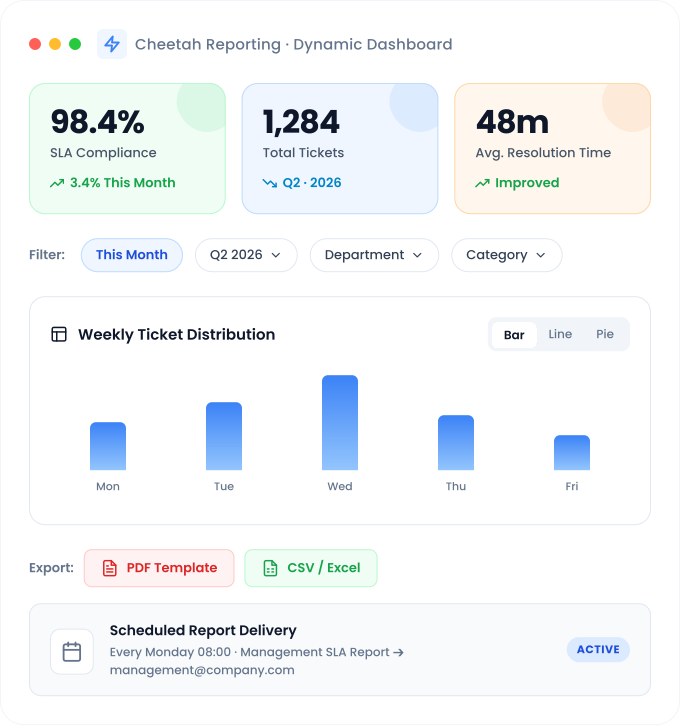
Perform real-time reporting with live, auto-updating dashboards. Slice and dice your data using dynamic filters to gain instant visibility by date, department, or category—empowering true self-service business intelligence.
- Real-time data synchronization
- Bar, line, and pie chart visualizations
- Dynamic filtering and segmentation
- KPI cards and trend indicators
Benefits of the Feature
Operational Impact
of Reporting
Time Savings with Automated Reporting
With scheduled automated reporting, weekly, monthly, or quarterly reports are generated at specific times and automatically delivered to stakeholders in PDF or CSV formats. This eliminates manual workload, allowing your team to focus on analysis rather than data preparation.
Scheduled Automated Reporting
Self-Service Business Intelligence
Dynamic dashboards and filters enable every user to generate real-time reports tailored to their needs. Dependency on IT or analysts is eliminated, ensuring the right data reaches the right person at the right time.
Self-Service Reporting
Data-Driven Decision Making
Through KPI reporting, operational performance is measured with concrete data. SLA compliance, average resolution time, ticket volume, and cost analysis—all metrics are tracked within a single dashboard, providing business intelligence reports ready for executive meetings.
KPI Reporting & Analytics
Step by Step
How it Works?

Design Your Report
Create your PDF template or dashboard layout. Define which metrics to display, the type of visualization to use, and where they appear. Your corporate brand identity is applied automatically.

Connect Your Data
Link report fields to platform data sources. Define filters, date ranges, and conditions. Dynamic fields are populated automatically when the report runs.

Set Your Schedule
Configure the schedule for automated reporting. Choose daily, weekly, monthly, or custom intervals. Specify the recipients and select the format (PDF or CSV).

Automated Distribution
At the scheduled time, the report is generated and delivered to the specified recipients via email. Dashboards remain updated with real-time data, and all deliveries are logged.
Use Cases
Who Uses it?
Service Manager
Weekly SLA Reporting
My SLA report arrives automatically every Monday morning—showing compliance rates, average resolution times, and breach counts. It’s ready for me and my management team. Manual reporting is a thing of the past.
Weekly Reporting Automated
Executive Management
/ C-Level
KPI Dashboards & Real-Time Reporting
Before meetings, I check the real-time status on the dynamic dashboard. I no longer have to wait for reports to answer questions like ‘How many tickets arrived this month?’ or ‘What is our SLA status?’—it’s all there on the screen.
Real-Time Business Intelligence Reporting
Operations Team
CSV Data Export & Analysis
Our monthly data analysis is streamlined as CSV files are generated automatically and pushed to our accounting system. Thanks to ERP integration, manual data entry is completely eliminated, and the risk of error is zero.
Data Transfer Automated
SPIDYA
Cheetah Low - Code Features
Turn your processes into products and applications in no time with the features of the Cheetah Low-Code Development Platform!
F.A.Q
Frequently Asked Questions
How does automated reporting work?
Once the report template and schedule are defined, the system automatically generates the report at the specified time. Dynamic fields are populated with real-time data, converted to PDF or CSV format, and emailed to designated recipients. All deliveries are logged, and failed attempts are automatically retried.
How can I customize the PDF report template?
Using Cheetah’s report design tool, you can create PDF templates that align with your corporate brand identity. Define your logo, color palette, fonts, layout, and field positioning. Platform data is automatically linked to template fields, and multiple templates can be defined for different report types.
How do I perform real-time reporting with dynamic dashboards?
Dashboards update continuously with real-time data—no manual refresh is required. Use dynamic filters to segment data by date range, department, category, or assigned person. Visualizations (bar charts, line graphs, pie charts, and KPI cards) update instantly, providing true self-service business intelligence.
Who can receive automated reports?
Automated delivery can be configured for individual users, roles, or email groups. Rules such as “Send SLA report to the management team every Monday morning” are easily set up within the platform. The delivery status of all sent reports can be monitored in the log records.
Can CSV reports be integrated with ERP or accounting systems?
Yes. Since CSV reports are generated in standard formats, they can be easily imported into external systems such as ERP, accounting software, or data warehouses. With Cheetah’s Workflow Engine integration, you can configure CSVs to be automatically pushed to external systems the moment they are generated.
How many different report templates can be defined?
Unlimited. You can create independent report templates for every department, use case, or reporting period. Whether it’s a weekly SLA report, monthly ticket analysis, quarterly KPI summary, or customer-specific performance report, each can be managed with distinct templates and scheduled independently.
Does reporting integrate with other Cheetah modules?
Yes. The SLA module, ticket management, service catalog, workflows, and user data are directly connected to the reporting engine. All data across the platform is managed through a single reporting infrastructure, supporting cross-module reporting—such as combining SLA compliance data with ticket categories.
Contact Us
Carry Your Business Processes into the Future with Digital Transformation!
Contact us for digital solutions tailored to your business processes.
Let us analyze your needs and create a clear roadmap.
Let us analyze your needs and create a clear roadmap.
